
Faq About The TSA
Producing images in Trial Sequential Analysis for publication use
To create an image of the TSA graph that you will use for publication, e.g. RevMan Web, the best way is to use the built-in Report Generator. This will create a set of HTML documents along with image files of all graphs. The file format of the images is PNG (Portable Network Graphics). If this is not an accepted format for your publication, it is still possible to convert the PNG format into another format, using your favourite image software.
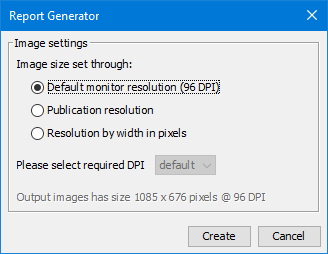
Follow these steps to generate the report:
- 1. Open the Meta-analysis file in TSA
- 2. Generate the graphs by clicking ”Perform calculations” on the ”TSA” tab
- 3. Click on the ”Graphs” tab and click ”Generate TSA Report”. You will be presented to a dialogue box (see copied image) with three options:
Default monitor resolution: This will create image files having the exact dimensions as the graph on your screen. Resizing the window of the TSA programme will result in the images having equivalent dimensions.
Publication resolution: By choosing this option, you can control the size of the images by a DPI (dots per inch) factor. You are presented with further options for scaling the size of the graph currently on your screen, according to a set of predefined DPI options. An example: if you choose 400 DPI, and your monitor resolution is 96 DPI, and your image width is 1200 pixels, the width of the images will be 1200 pixels * 400 DPI / 96 DPI = 5000 pixels. The height of the images are scaled in the same manner.
Resolution by width in pixels: By choosing this option, you can control the size of the images by specifying the exact width. Height is adjusted accordingly to maintain correct scaling.
- 4. Finally, click ”Create” and choose a folder in which the output of the report should be saved.
Need help?
Lorem ipsum dolor sit amet, consectetur adipiscing elit. Ut elit tellus, luctus nec ullamcorper mattis, pulvinar dapibus leo.
- +45 3545 7101
